LEENORA WhatsApp
← All workReal projectLive since 6 September 2026

Client system · KORTO Café · Café

One system for the whole café

KORTO Cloud runs a café in Egypt from the first order to the day close: tables, the bar, the till, stock, staff, money and an AI assistant.

50screens, from the bar to payroll
8staff roles
13features the owner switches on and off

Watch

The project in one minute

Before

The problem

The café closed every day on two paper sheets: a daily sales sheet and a sheet of the owners' own orders. The menu existed as WhatsApp photos and the recipes as a list.

So the owner had no exact daily numbers for what was sold, what was in the cash drawer and what left the store. Discounts, cancels and cash moves had no permissions and no trail.

What we built

The answer

LEENORA built KORTO Cloud around the café's own day. Work started on 29 August 2026 from the café's menu photos, recipe list and paper sheets, and the cloud version went live on 6 September 2026.

It is a web app, Arabic first with English, that installs on phones and tablets and keeps taking orders when the internet is down. A Telegram bot sends the day's summary and answers the owner's questions.

Ten modules cover the floor and orders, the till, stock, the menu, staff, money, reports, control, the Leenora AI assistant and the customer side.

Eight roles use it, from the owner to the waiter and the barista, and each one sees only its part. It is still being improved in rounds of the owner's requests; the latest change went live on 10 November 2026.

In numbers

The project at a glance

50screens in the app
8staff roles, from owner to barista
13features the owner switches on and off
32kinds of café data Leenora AI can read

What's inside

Every feature

41 features in 10 groups

Floor and orders7
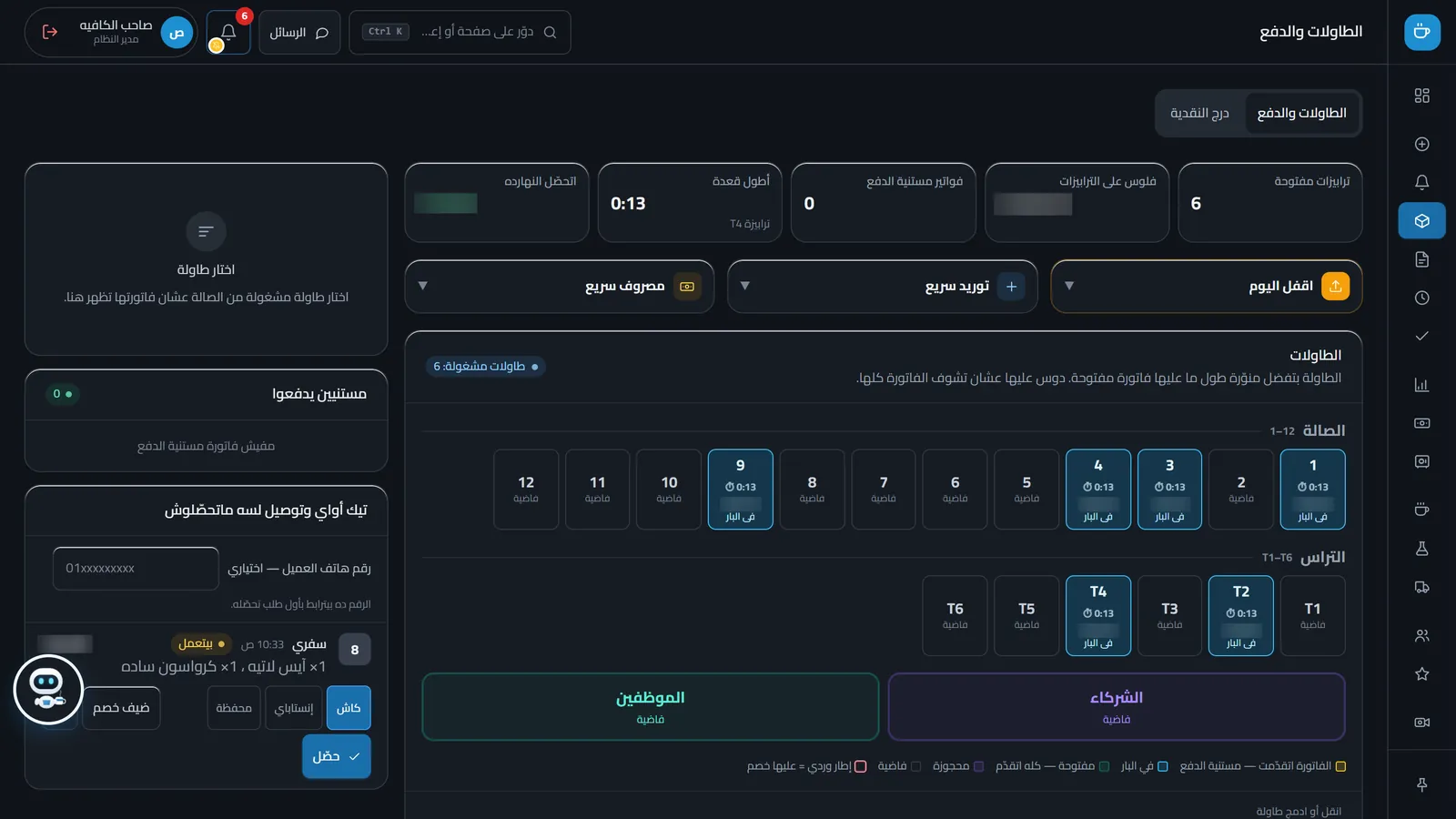
  • Tables mapShows every table with its open bill, how long it has been seated and whether its order is at the bar or ready, so one look tells you which tables need attention.
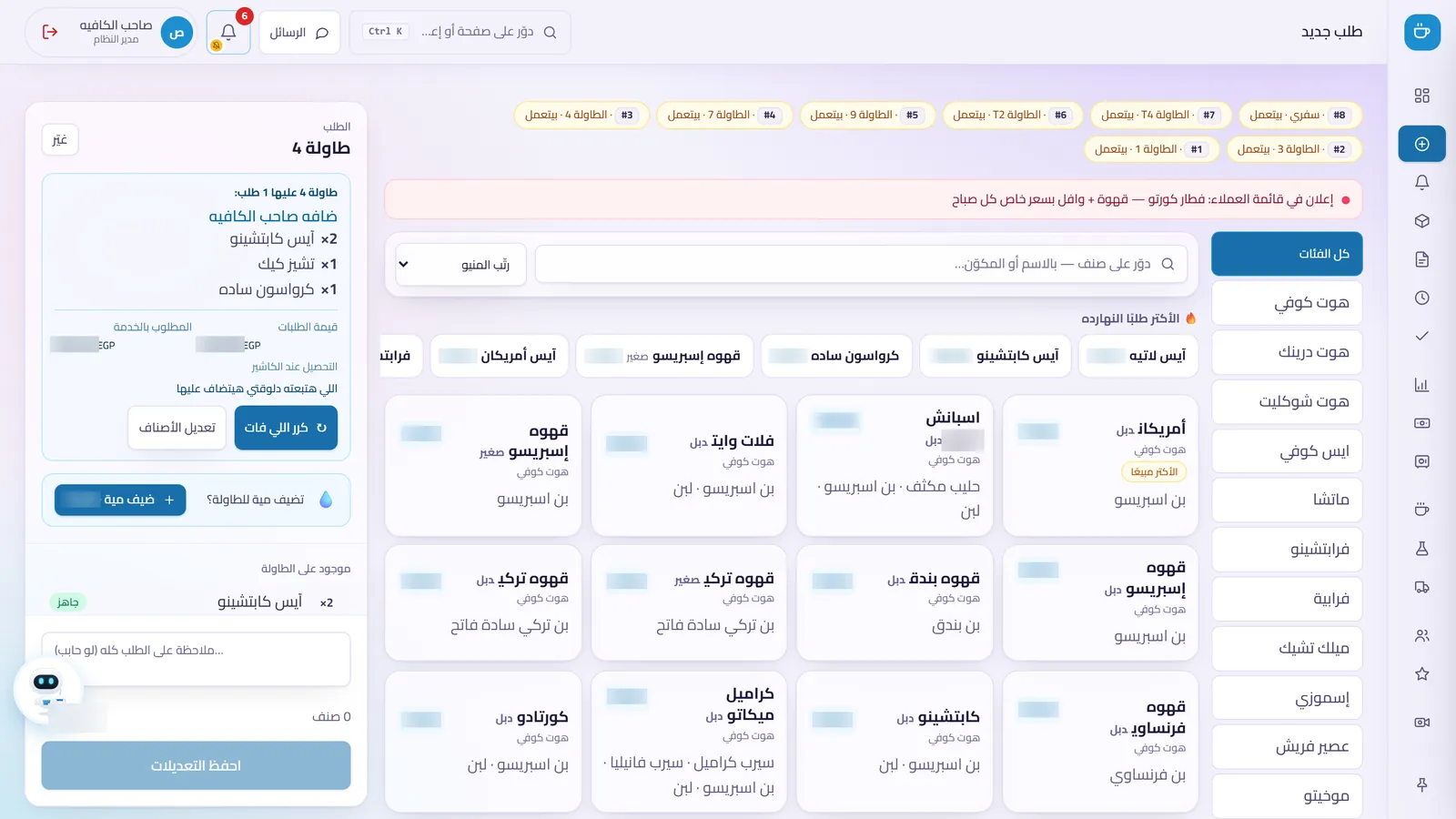
  • Order padWaiters add items in two taps, with sizes, add-ons and quick choices like sugar, then review before sending, so orders reach the bar clean.
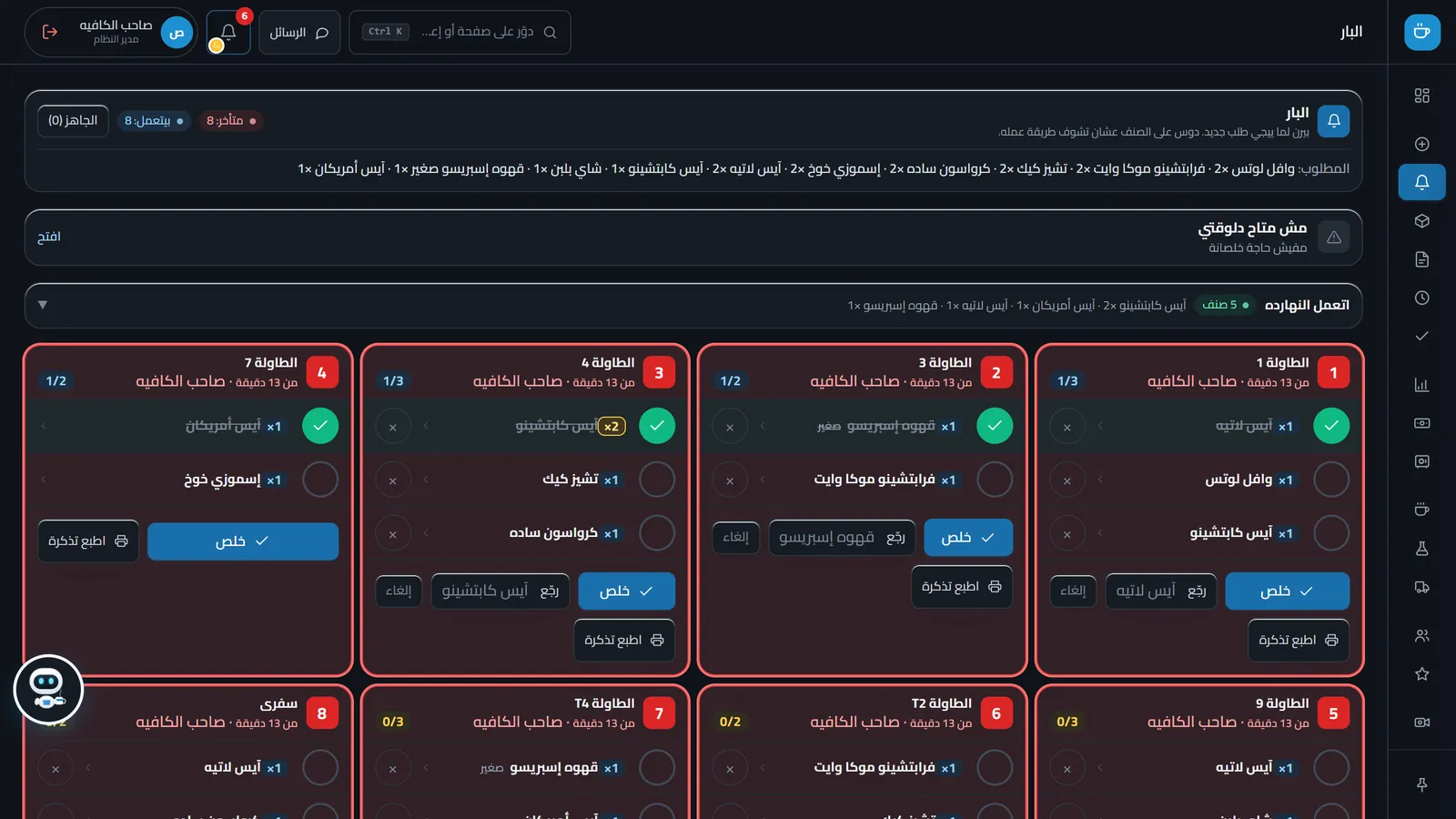
  • Bar screenNew orders appear at the bar coloured by how long they have waited, with an alarm sound, and the barista ticks each item as done so nothing is forgotten.
  • Takeaway and deliveryOrders without a table, delivery platforms with their commission and a takeaway discount all go through the same till.
  • Offline tillOrders are kept on the device while the internet is down and sent when it is back, so service does not stop during an outage.
  • Waiter callA customer calls the waiter from the table and the call shows on the floor.
  • Cancel with a reasonCancelling an item needs a reason, and a manager PIN once it is prepared, which stops quiet cancellations.
Till and day close5
  • Day closeCloses the day by hand or automatically at 6:00 and sends a summary to Telegram, so the day ends with exact numbers instead of a paper sheet.
  • Bills and paymentsPresent the bill, print it, take part payments and split a bill between cash and other methods.
  • Discounts with limitsDiscounts have a ceiling and need a manager PIN above it, so they stay under control.
  • RefundsRefunds need a PIN and are recorded as a return or as waste, so every refund is accounted for.
  • Cash drawerDrawer sessions, cashier shifts, counting notes and coins, and money paid out of the drawer, so the drawer matches the system.
Stock and purchasing4
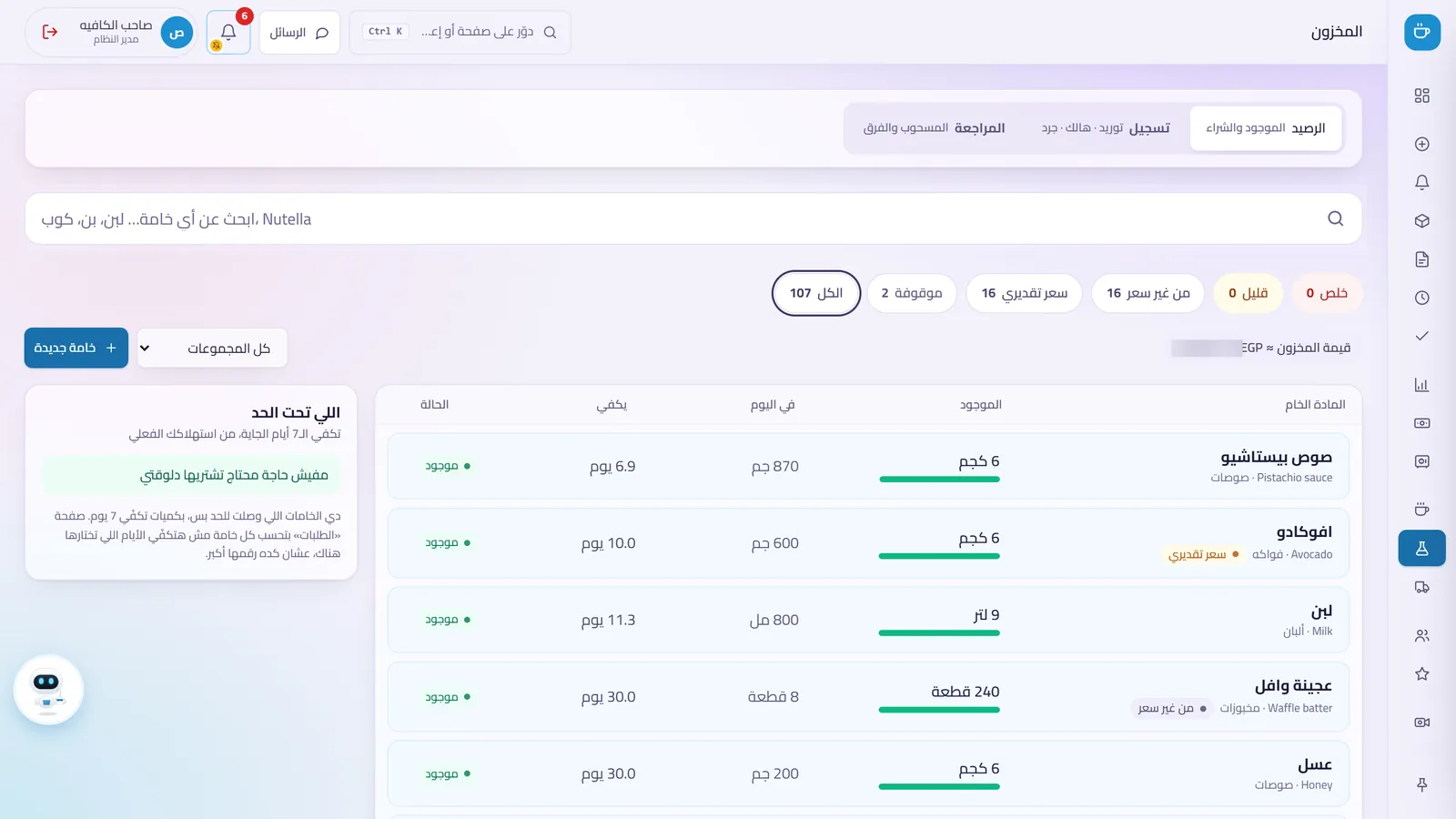
  • Live stock from recipesEvery sale takes its recipe's ingredients out of stock, and the store shows what is left, what is low and how many days it lasts.
  • Supply invoices, counts and wasteRecord what arrived, what was counted and what was thrown away, with reasons, so the stock stays true.
  • Stock reviewCompares any two counts with what sales say should have been used, which shows where stock leaks.
  • Orders and suppliersSuggests what to order from recent use and keeps the suppliers' ledger.
Menu2
  • Menu hubItems, categories, sizes, recipes and photos in one place, so the owner changes the menu from one screen.
  • OffersHappy hours, combos and promo cards with days, hours and a countdown, so offers run by themselves on time.
Staff5
  • Attendance with selfieStaff clock in with their PIN and a live selfie, and the board shows who is in, late or absent, so nobody clocks in for a friend.
  • PayrollOne month screen shows what each person earned, deductions and advances, with a pay out button and a record.
  • TeamEach person's card holds the job, leave, pay changes and staff meals, so all staff data is in one place.
  • TargetsSales targets per person or per role.
  • My pageEach person sees their own day, hours and requests.
Money4
  • Finance summaryWhat the café earned, what it holds and what it owes, plus what needs attention, in one screen.
  • TreasuryThe safe now, money on its way, money going out and the month's net profit, with a where from answer behind every figure.
  • Accountant's fileA monthly Excel file and a read-only accountant role, which means less work for the accountant.
  • Month closeFreezes a finished month so past numbers cannot change.
Reports3
  • Period reportsRevenue, profit after materials, bills, best sellers, busy hours and payment methods for any day or period, compared with the period before.
  • Day logThe day's orders, bills and moves on one board, with each table's story.
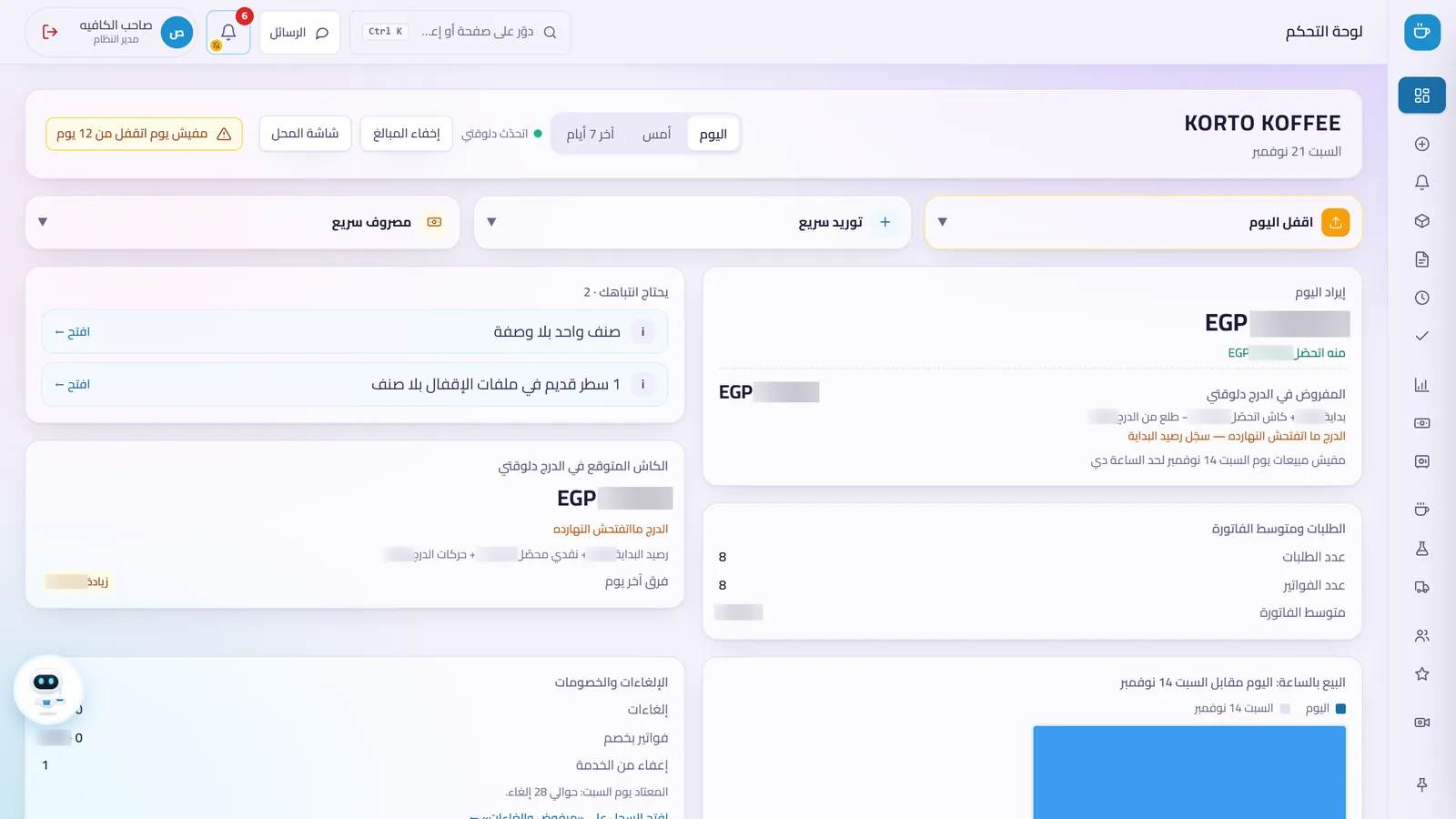
  • Home dashboardToday's sales, the drawer, quick supply and expense entries and the items that need attention.
Control and settings7
  • Activity logEvery sign-in, order, cancel, discount and cash move with who did it, filters and strange moves flagged, so nothing happens without a trail.
  • Time lock and manager PINBlocks back-dated edits, and sensitive actions need the manager's PIN.
  • NotificationsThe bell, phone push and Telegram alerts reach the right person right away.
  • Staff messagesMessages between roles that delete themselves after 12 hours.
  • PermissionsWhat each role, or each person, may do, action by action, so everyone sees only their part.
  • SettingsThe café's data, look, colours, dark mode, tables, printing and feature switches, set up by the owner without a developer.
  • BackupsOfficial backups, a check that they restore, and a nightly copy.
Leenora AI2
  • Leenora assistantAn assistant on every screen and a Telegram bot: you ask in Egyptian Arabic how much was sold today and it answers from the café's data.
  • Acts after confirmationIt can do some tasks, like reminders or a supplier payment link, only after a confirmation and as the asking person's own account, and it refuses some areas on purpose.
Customer side2
  • QR menu per tableCustomers scan, see the menu and live offers and can call the waiter (built into the system, switched on per café).
  • Reservations and loyaltyBookings with deposits and loyalty points by phone number (built into the system, switched on per café).

Inside the project

NOVA walks you through it

23 screens, one at a time

01 / 23Bar screen: order cards per table, dark mode

This is the bar screen. Each card is one table, and the green tick at the top of a card means that drink is done, so nothing gets forgotten.

NOVA points at the screen
Bar screen: order cards per table, dark mode
02 / 23Tables map with seated times

Look at the blue tiles in the middle: those tables are occupied, each with a timer. One glance tells the owner who has been waiting.
NOVA points at the screen
Tables map with seated times
03 / 23Order pad for a table

Here the waiter builds an order. Categories sit on the right, items in the middle, and the table's order collects in the panel on the left before it is sent.
NOVA points at the screen
Order pad for a table
04 / 23Home dashboard with the close day button

I start the owner's day on this screen. The orange button at the top right closes the day, and the card below it on the left lists what needs attention.
NOVA points at the screen
Home dashboard with the close day button
05 / 23Stock: what is left and days it lasts

Every row is one ingredient. Follow the column of days in the middle: it says how long each one will last, so the café orders before it runs out.
NOVA points at the screen
Stock: what is left and days it lasts
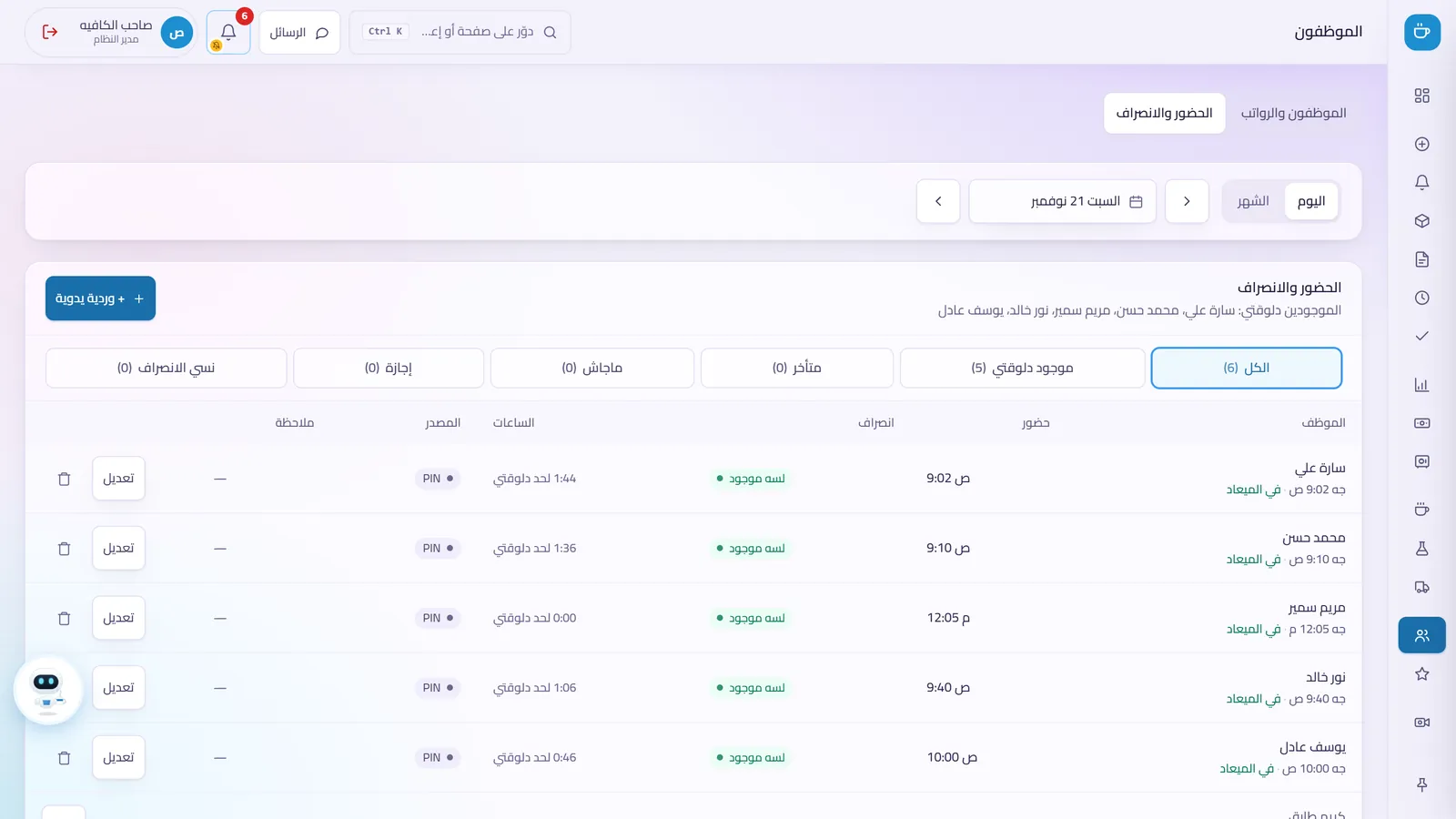
06 / 23Attendance board: who is in right now

The attendance board. Each row shows when a person clocked in, and the green tag in the middle says they are still here. The owner sees the shift without asking.
NOVA points at the screen
Attendance board: who is in right now
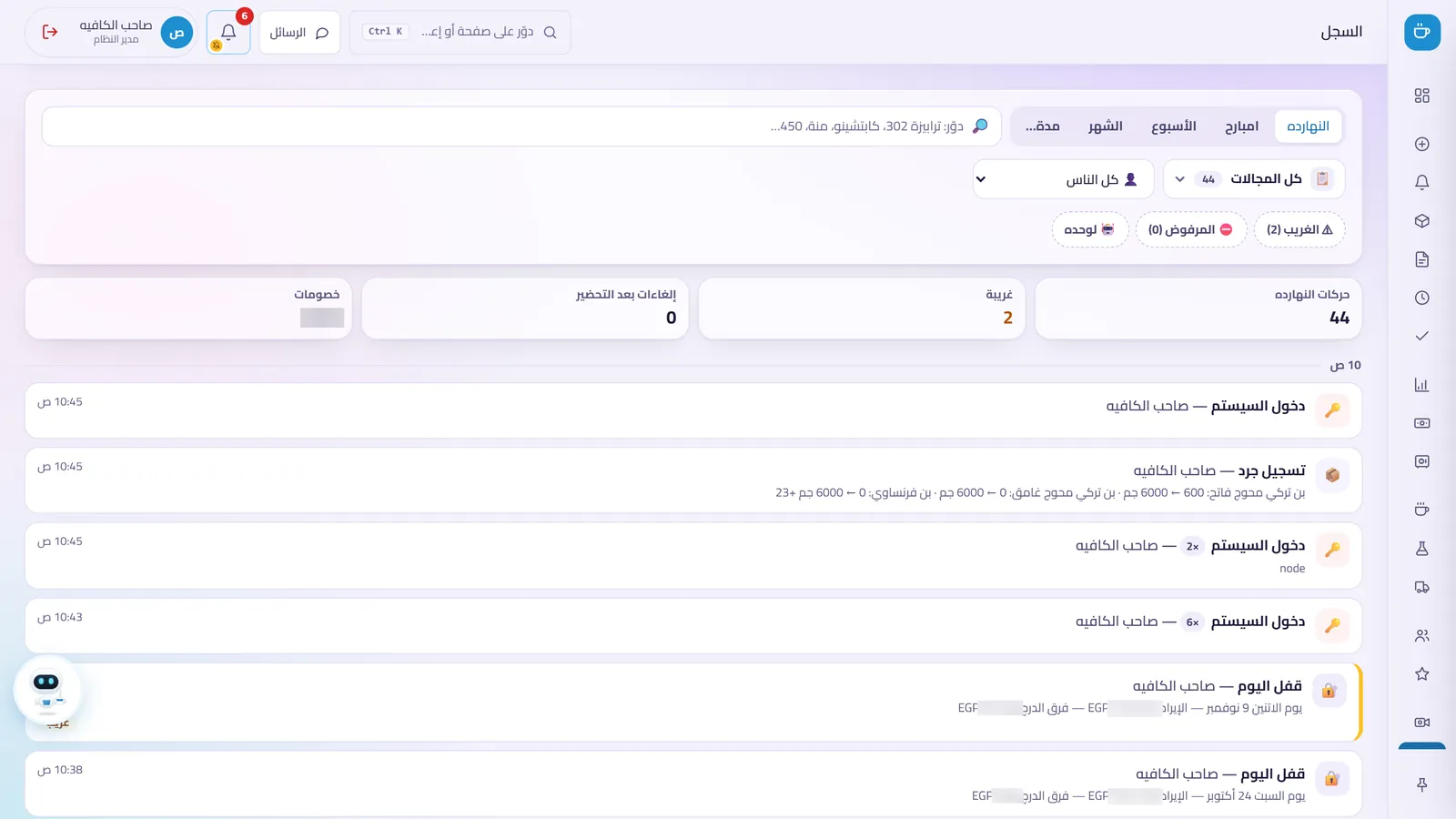
07 / 23Activity log: every move and who did it

Nothing here happens without a trail. The counters on top show today's moves and the strange ones, and each line below names who did what and when.
NOVA points at the screen
Activity log: every move and who did it
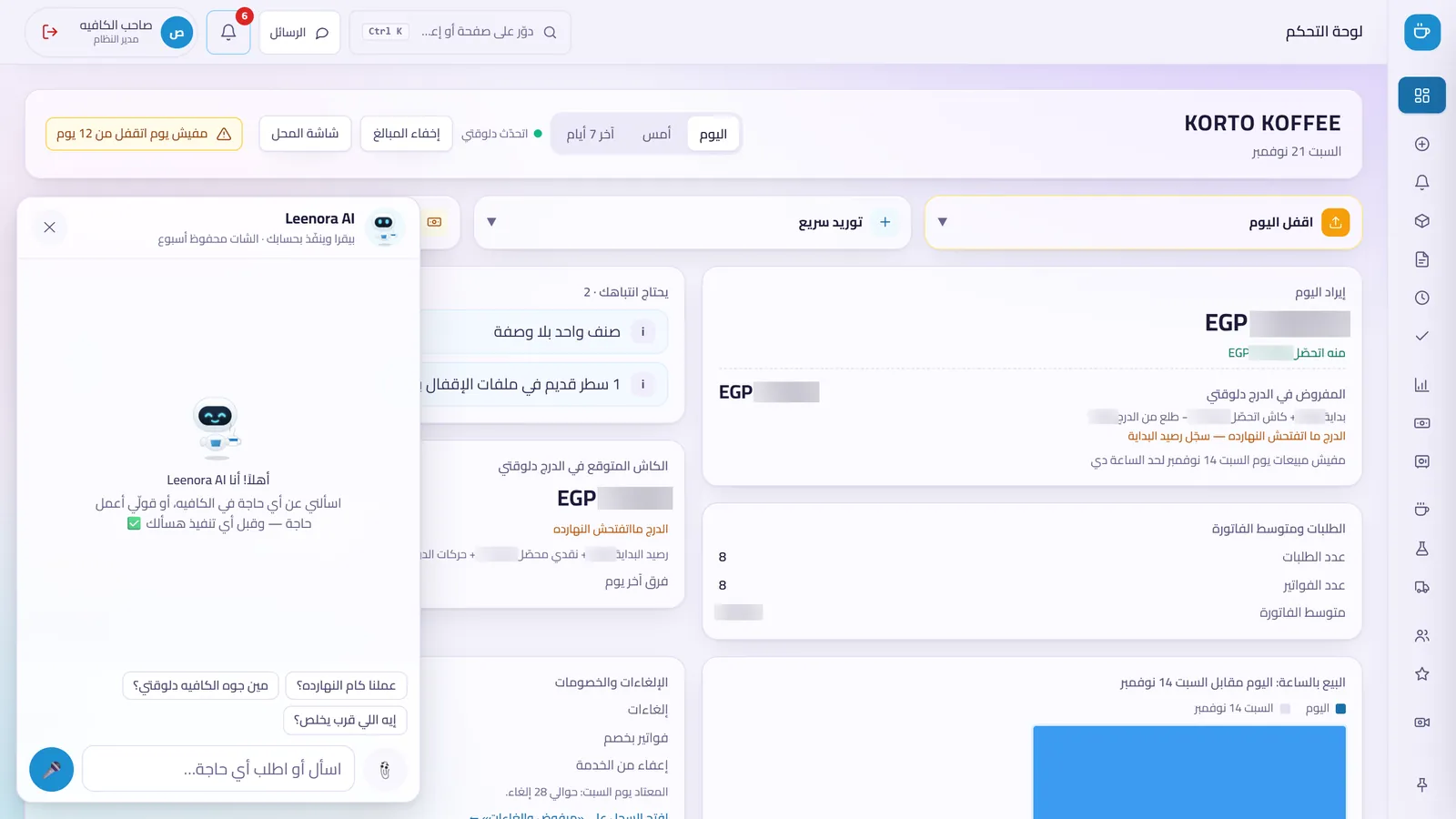
08 / 23Leenora AI panel with suggested questions

That is me, in the panel on the left. The owner taps one of the suggested questions at the bottom, or types one, and I answer from the café's data.
NOVA points at the screen
Leenora AI panel with suggested questions
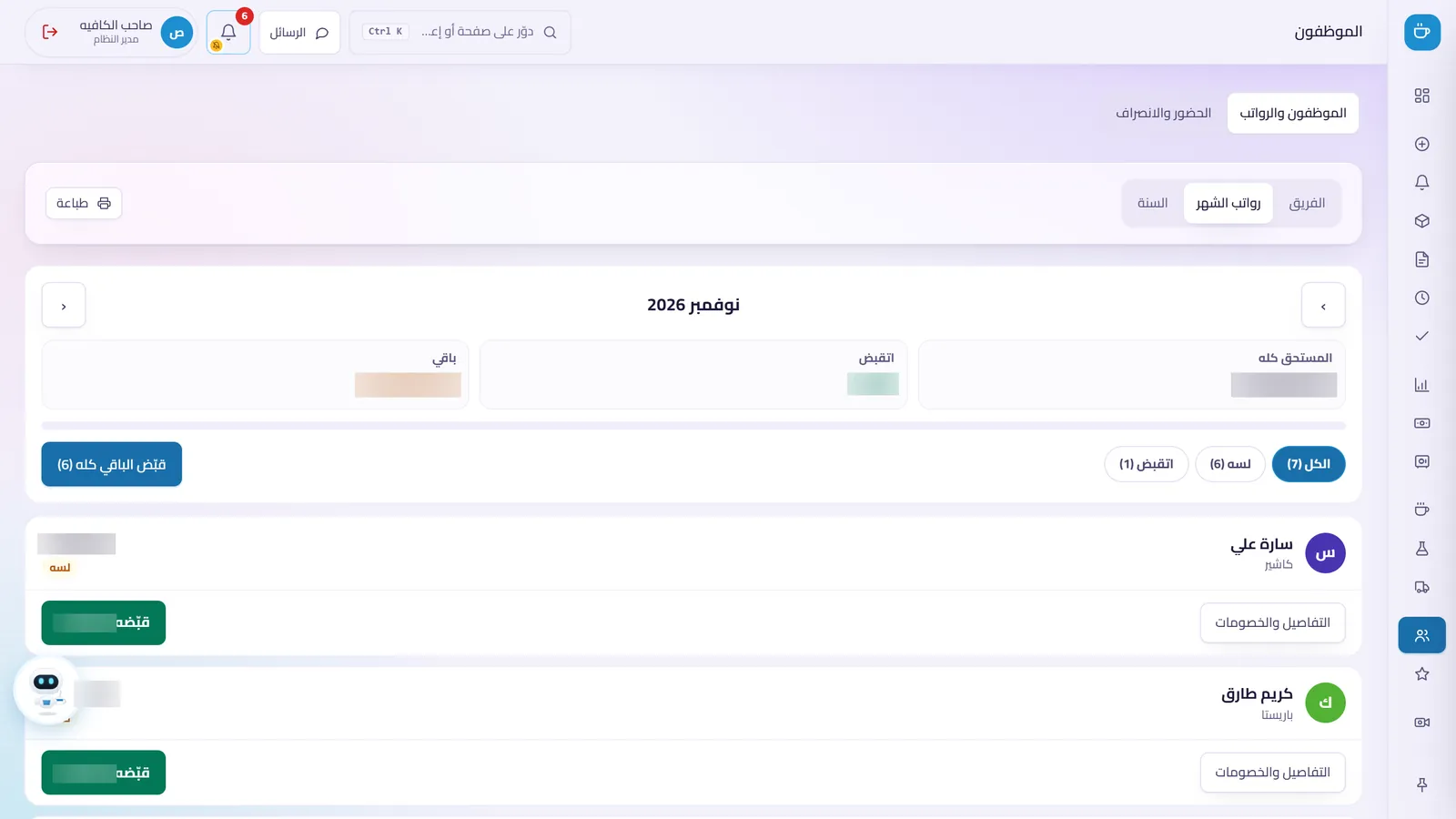
09 / 23Month payroll with pay out buttons

One screen for the month's pay. Each person has a green pay out button on the left, and the blue button above pays everyone who is left.
NOVA points at the screen
Month payroll with pay out buttons
10 / 23Treasury with a where from link

Four cards across the top describe the safe. Notice the small blue link under each one: it asks where from, and opens the entries behind that card.
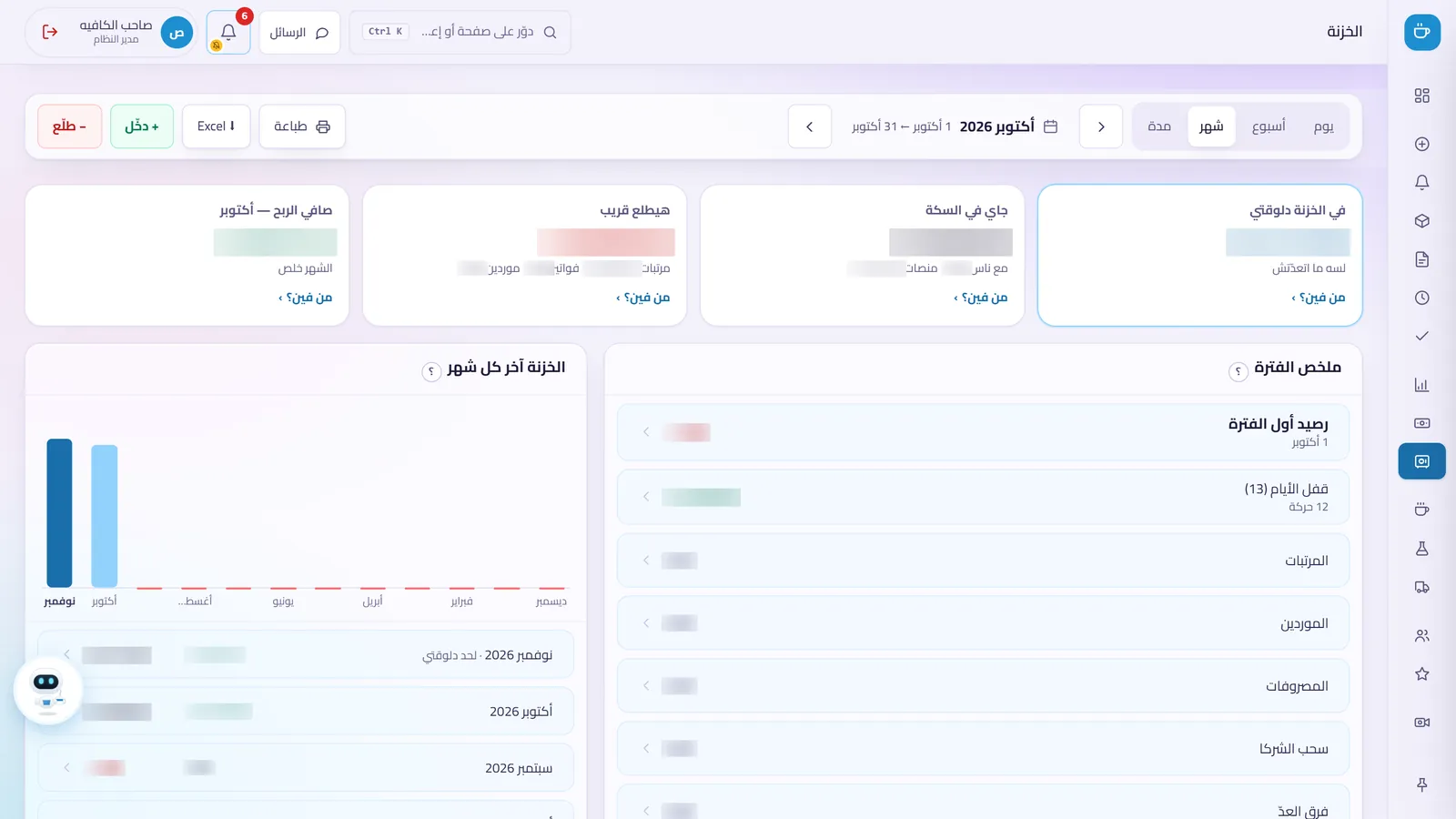
NOVA points at the screen
Treasury with a where from link
11 / 23Finance summary and daily sales chart

The three cards on top answer what you earned, what you hold and what you owe. The bars at the bottom show sales day by day against the dashed average.
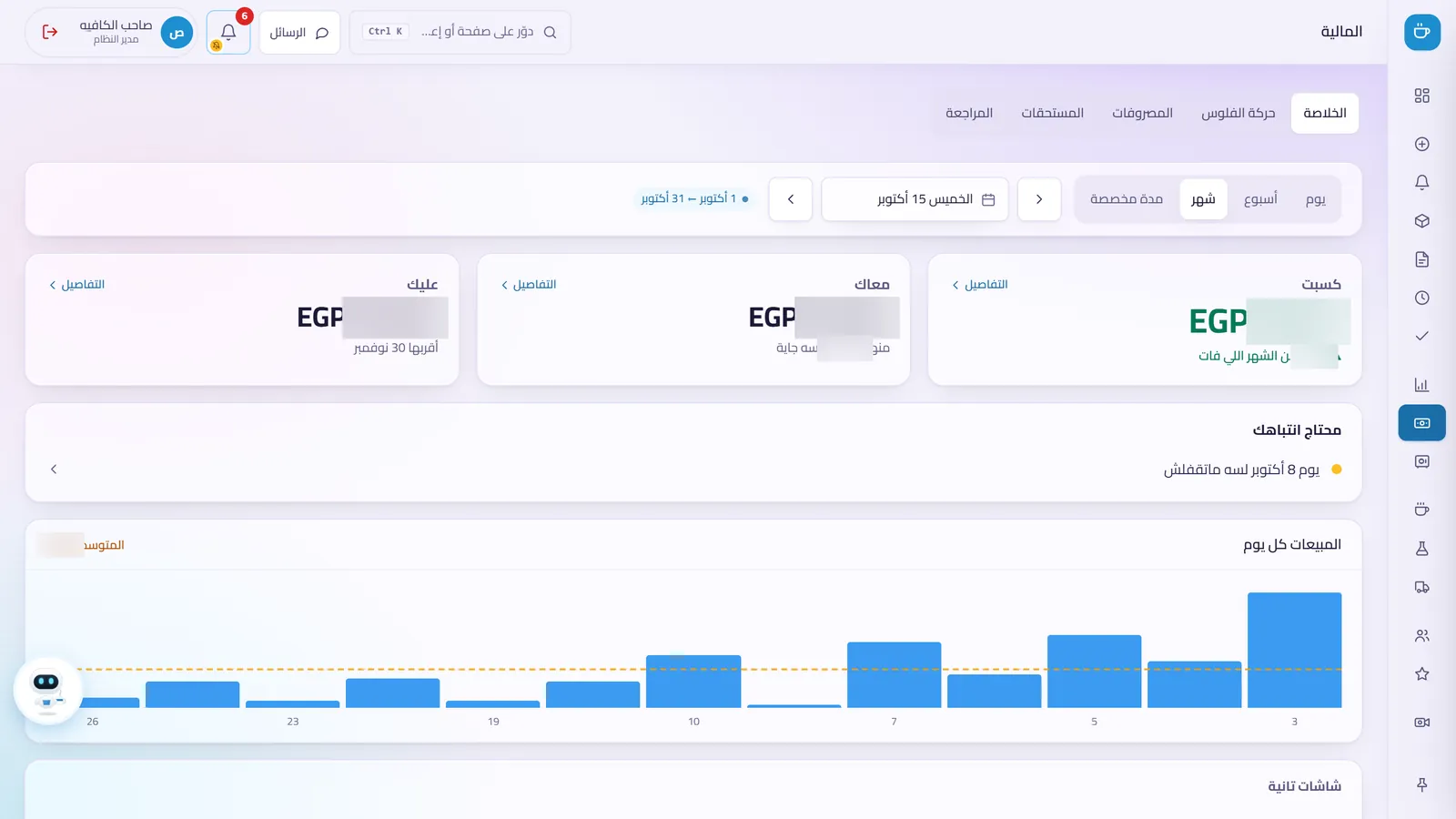
NOVA points at the screen
Finance summary and daily sales chart
12 / 23Period report layout

Pick any period in the bar at the top and the cards below rebuild for it. The middle panel splits payments by method, which the owner checks against the drawer.
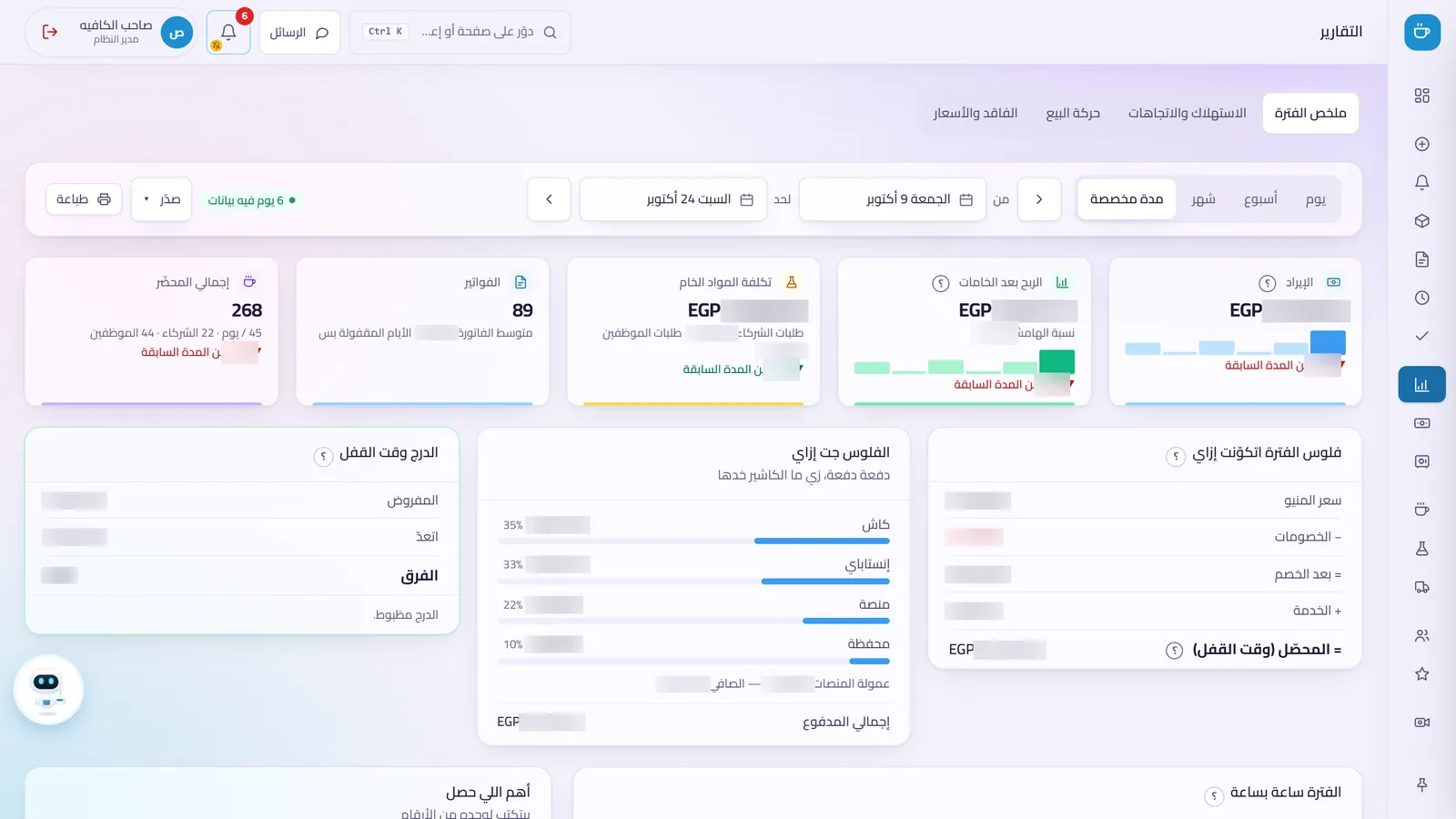
NOVA points at the screen
Period report layout
13 / 23Menu items by category

The whole menu lives here, grouped by category. The blue button on the left adds an item, so the owner changes the menu without calling anyone.
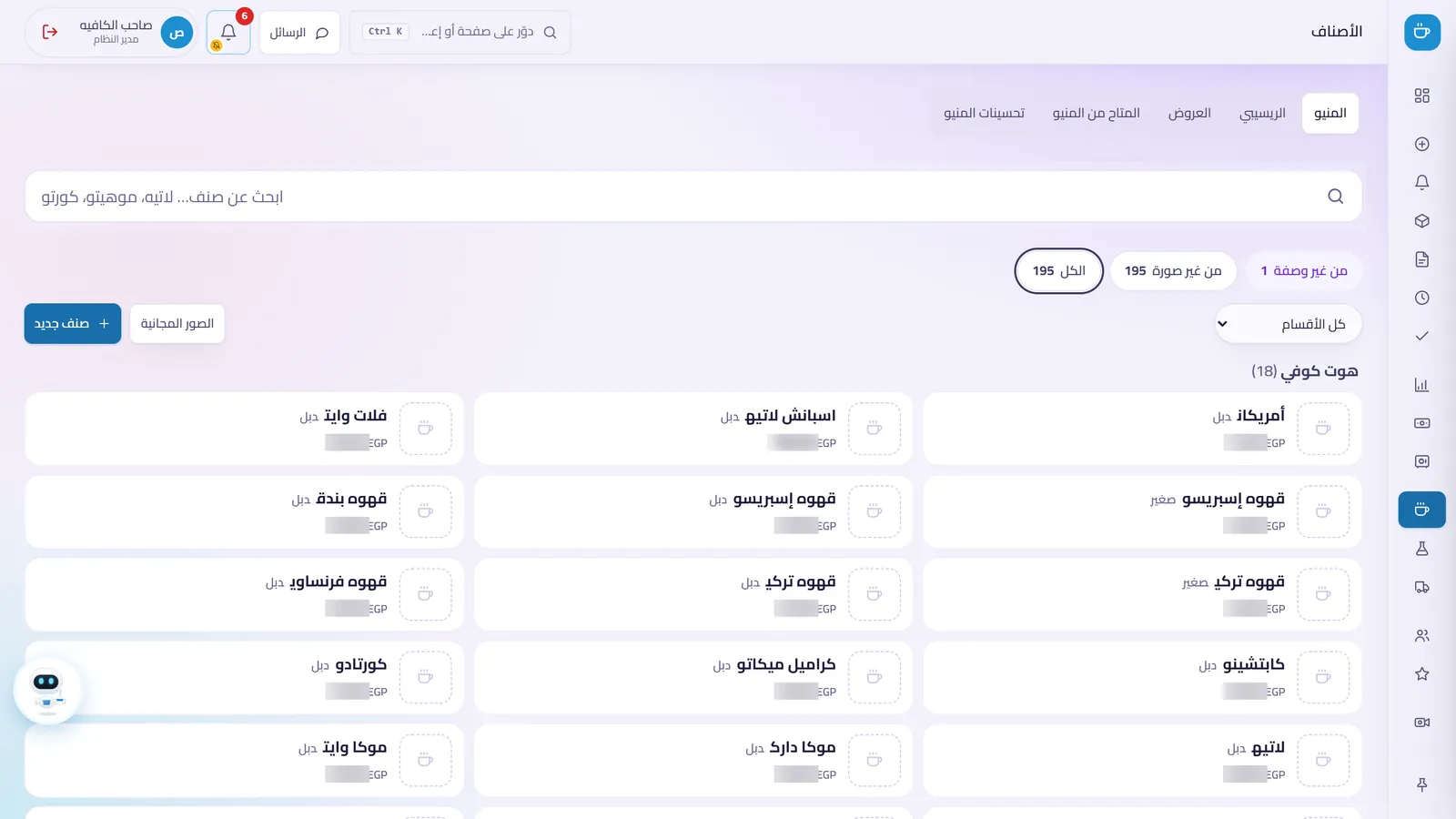
NOVA points at the screen
Menu items by category
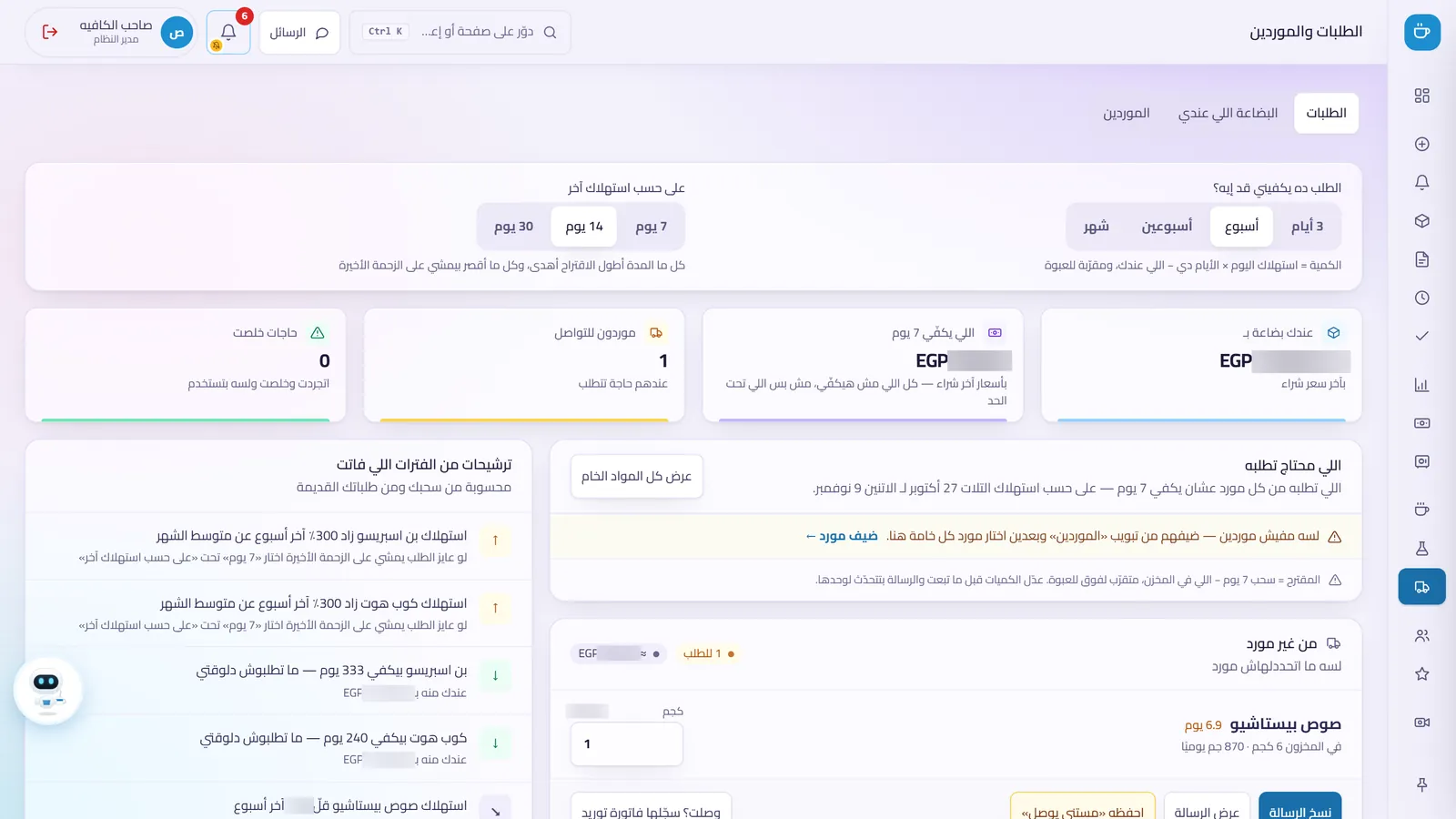
14 / 23Suggested orders and suppliers

At the top the owner chooses how long an order should last. The list on the left then points out which ingredients are being used faster or slower than usual.
NOVA points at the screen
Suggested orders and suppliers
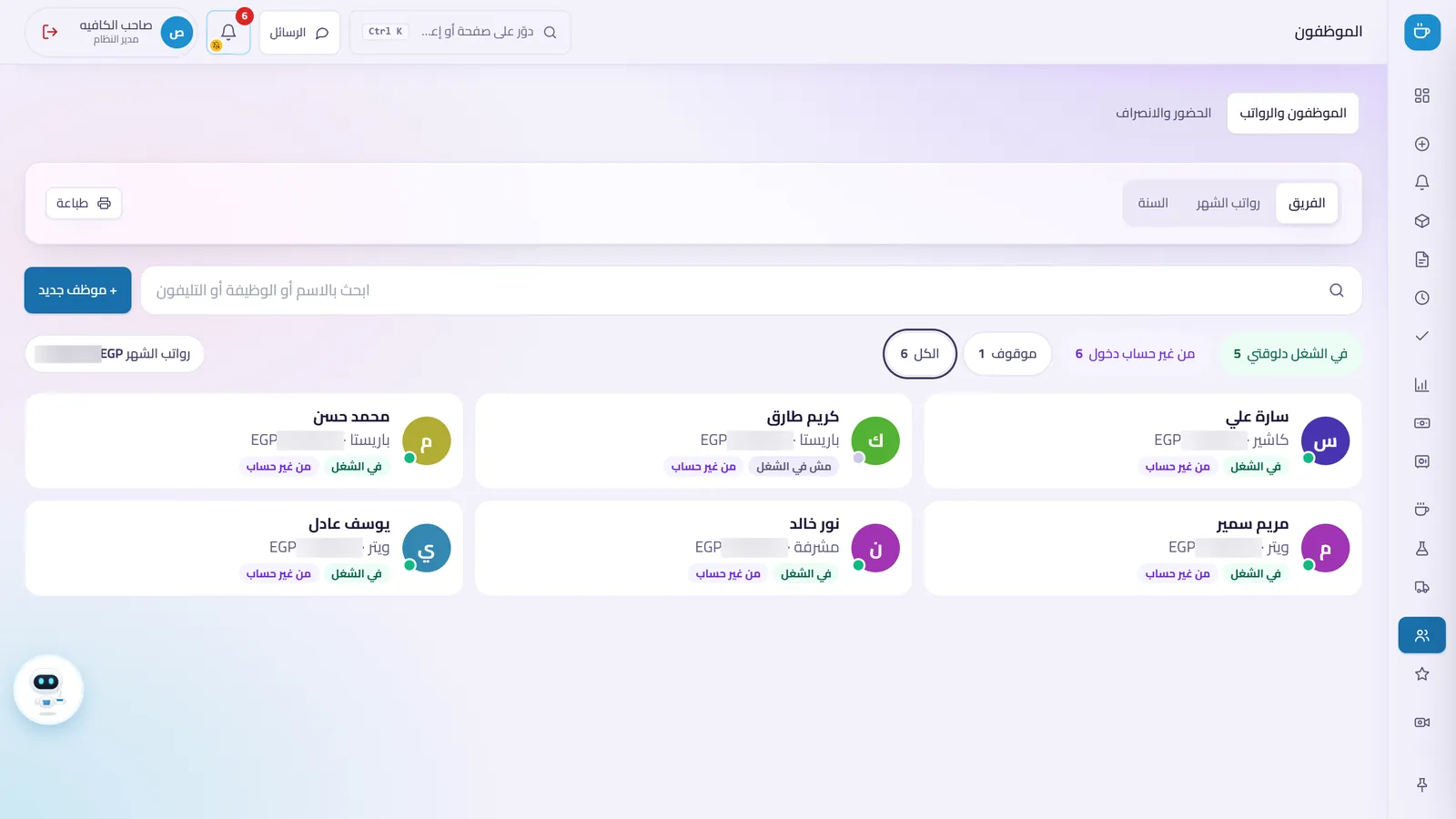
15 / 23Team cards with made-up names, pay blurred

Six demo staff cards. The small green tag on a card means that person is at work now, and the blue button on the left adds a person.
NOVA points at the screen
Team cards with made-up names, pay blurred
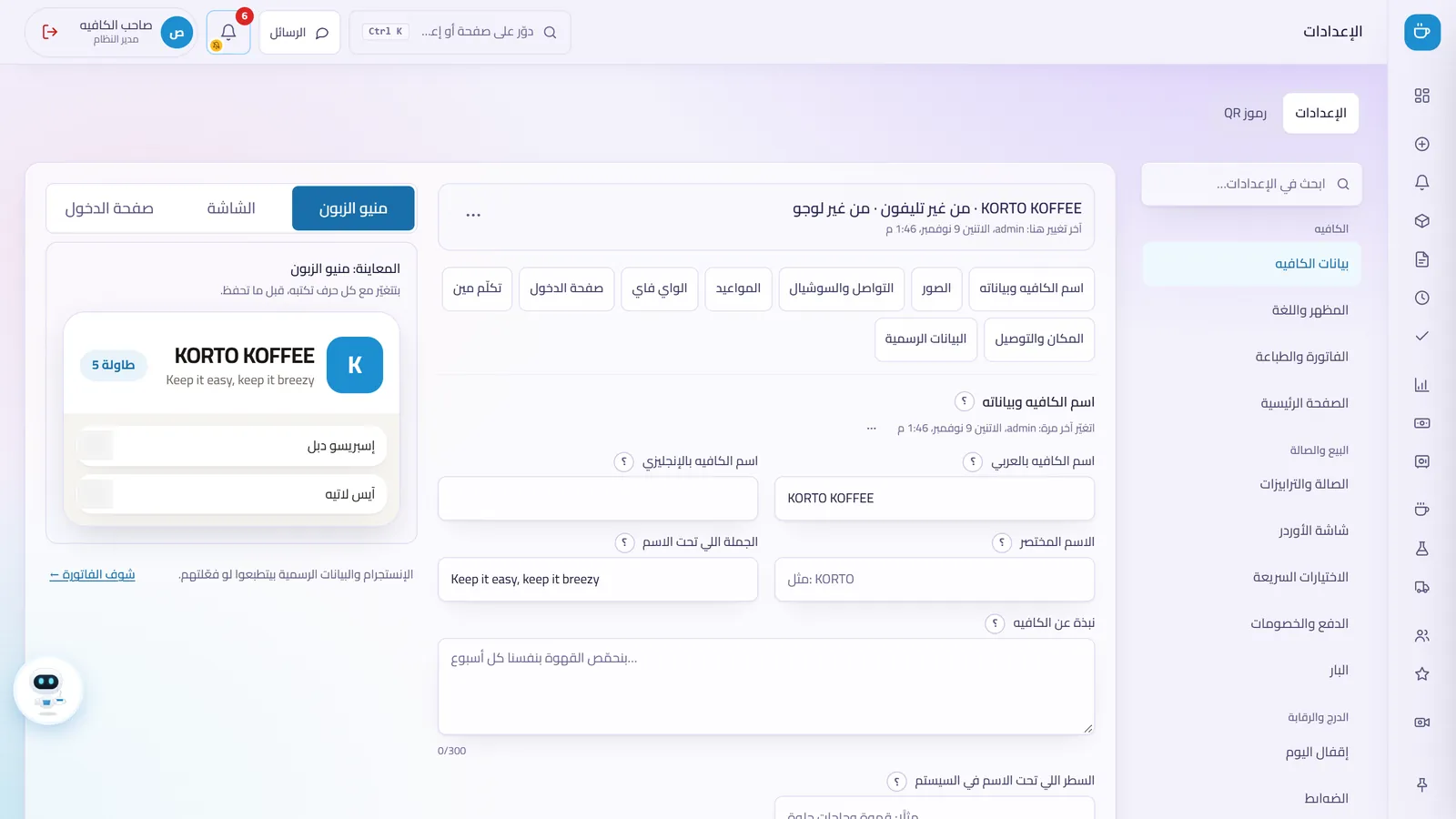
16 / 23Settings: the owner sets up the café

Settings belong to the owner, not to a developer. The form in the middle holds the café's name and tagline, and the preview on the left shows the customer menu.
NOVA points at the screen
Settings: the owner sets up the café
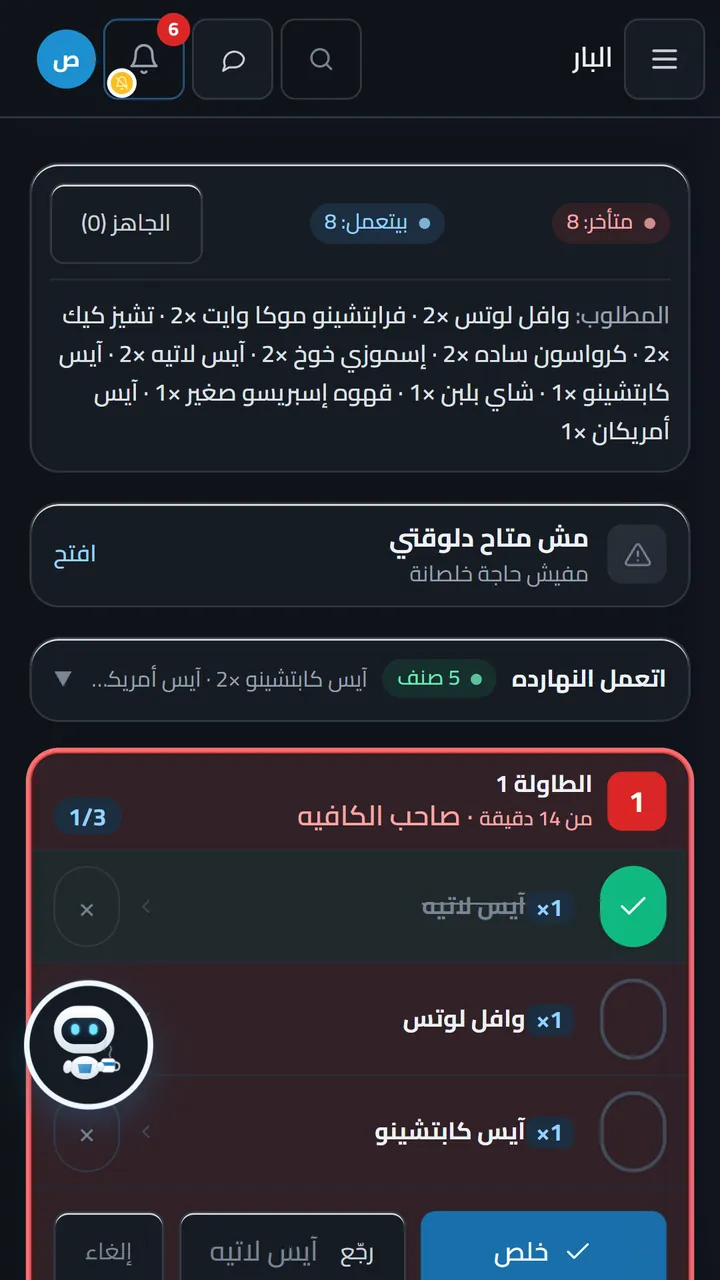
17 / 23Bar screen on a phone

A barista can run the bar from a phone. The two tags at the top count late and in-progress orders, and the red card below is table 1's order.
NOVA points at the screen
Bar screen on a phone
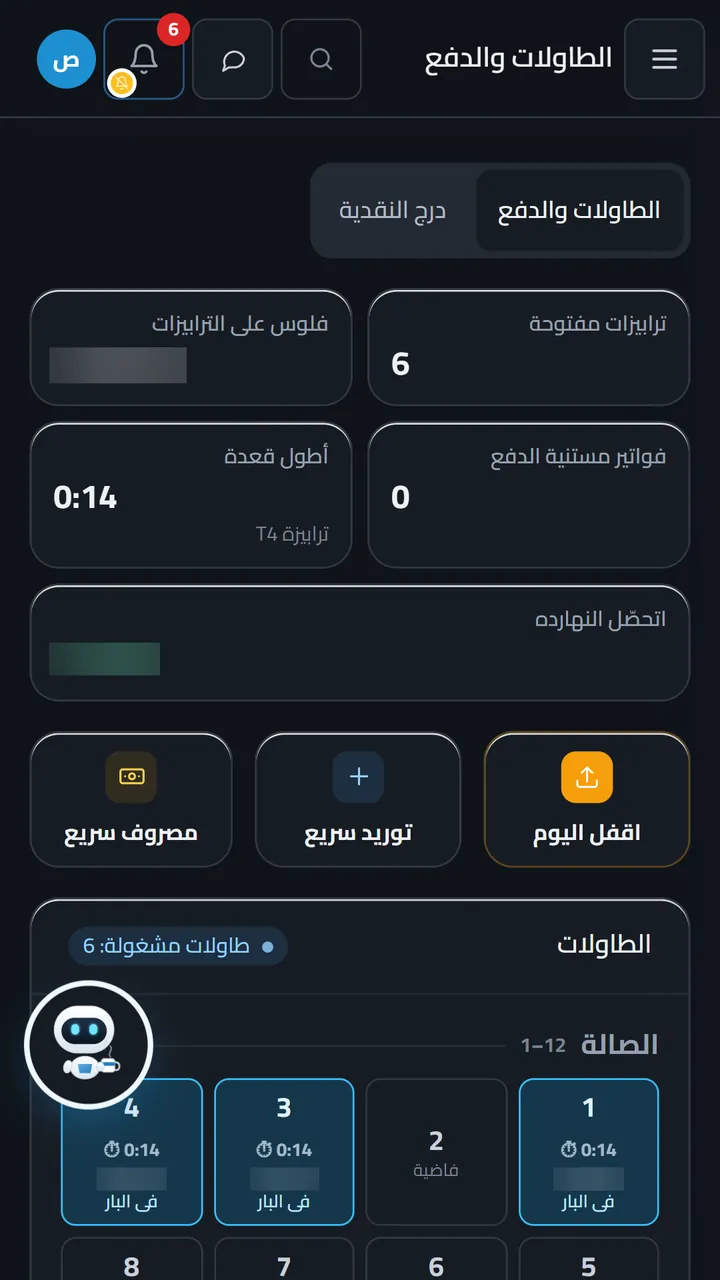
18 / 23Tables on a phone, dark mode

The same tables map on a phone. Counters come first, then the three quick buttons, and the tables sit at the bottom, so a supervisor checks the floor while walking.
NOVA points at the screen
Tables on a phone, dark mode
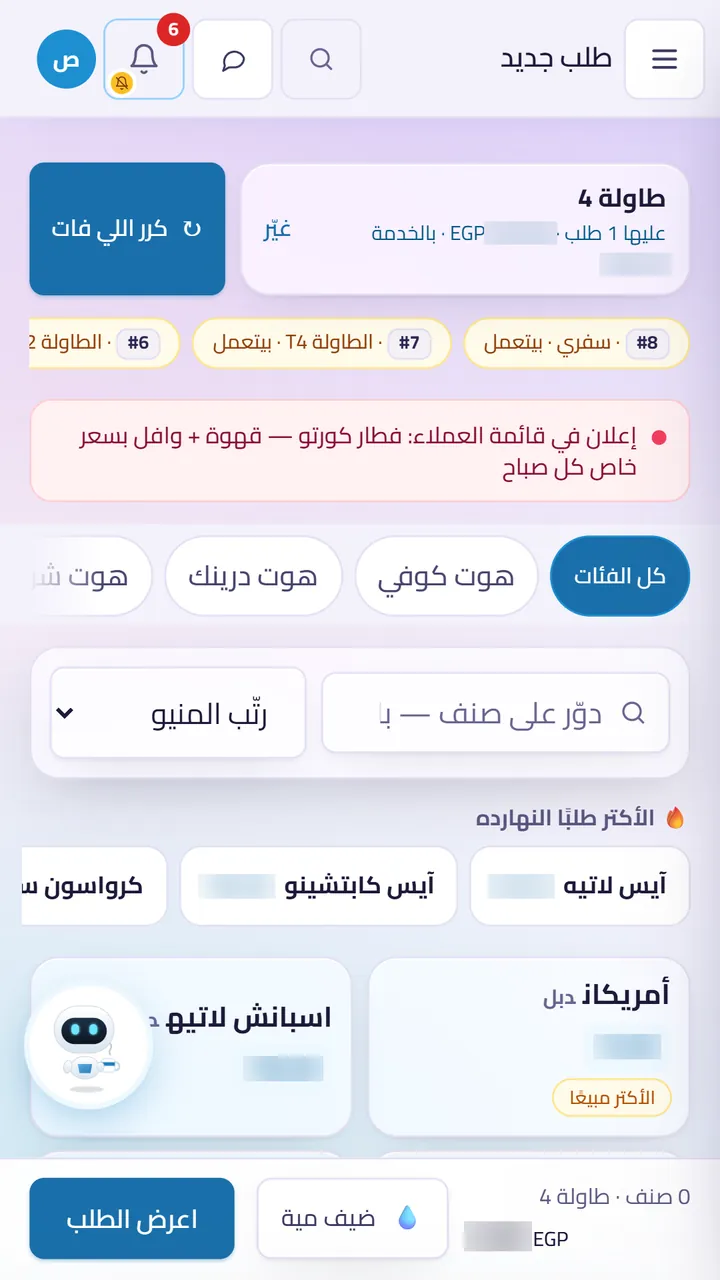
19 / 23Order pad on a phone

On a phone the order pad stacks up: the table at the top, category chips under it, and the blue button at the bottom left to review the order.
NOVA points at the screen
Order pad on a phone
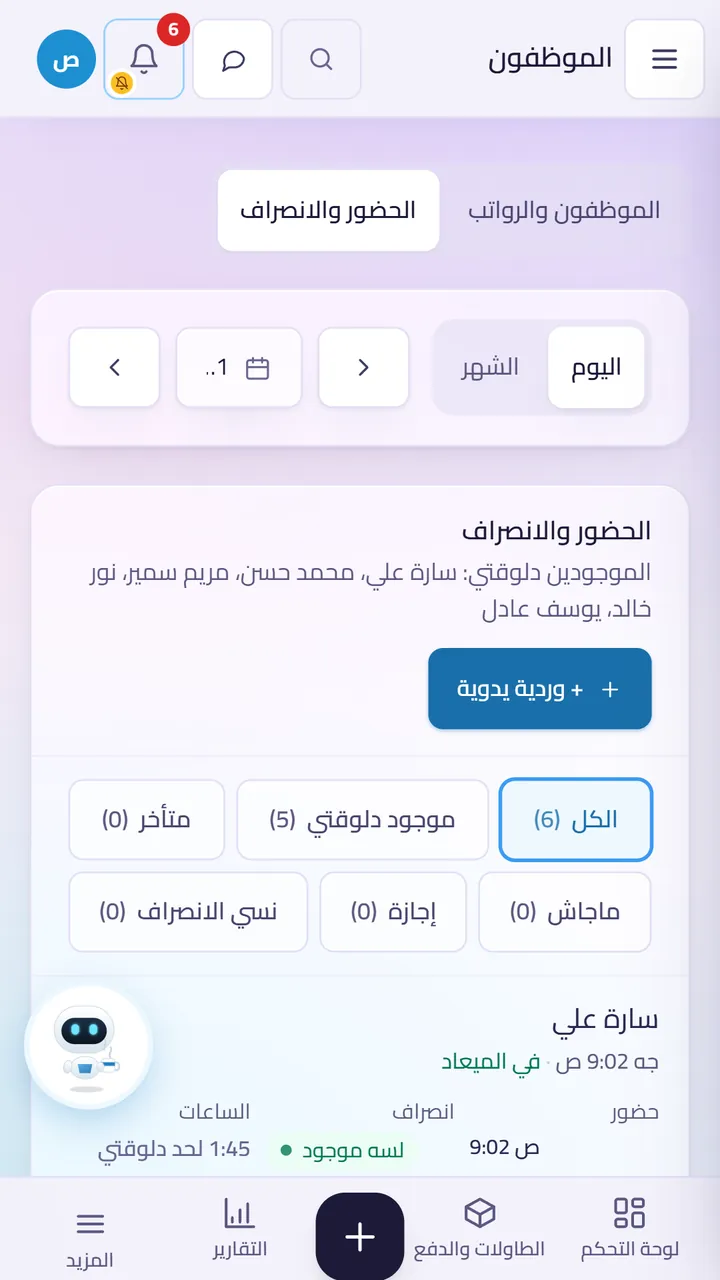
20 / 23Attendance on a phone

Who is in right now is written in one line near the top. Below it the filter buttons split the team into present, late, absent and on leave.
NOVA points at the screen
Attendance on a phone
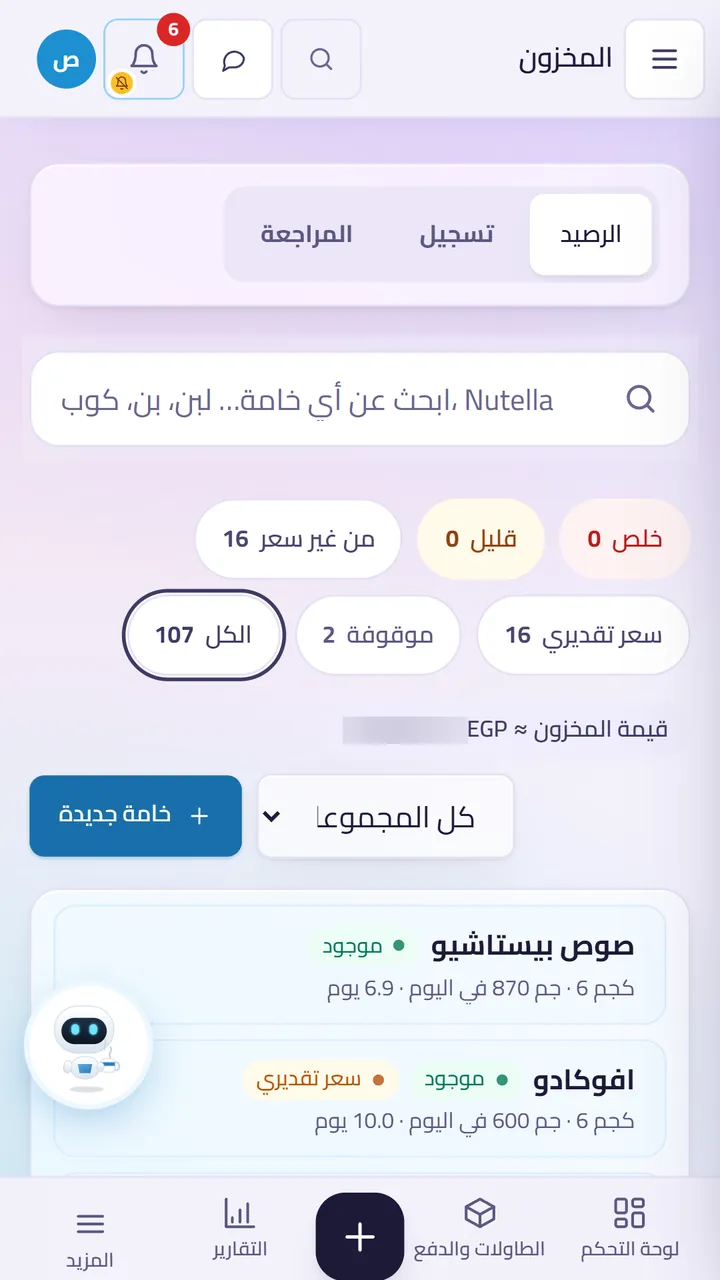
21 / 23Stock on a phone

Stock, checked from the store room. Each card at the bottom gives what is left, the daily use and the days it will last in a single line.
NOVA points at the screen
Stock on a phone
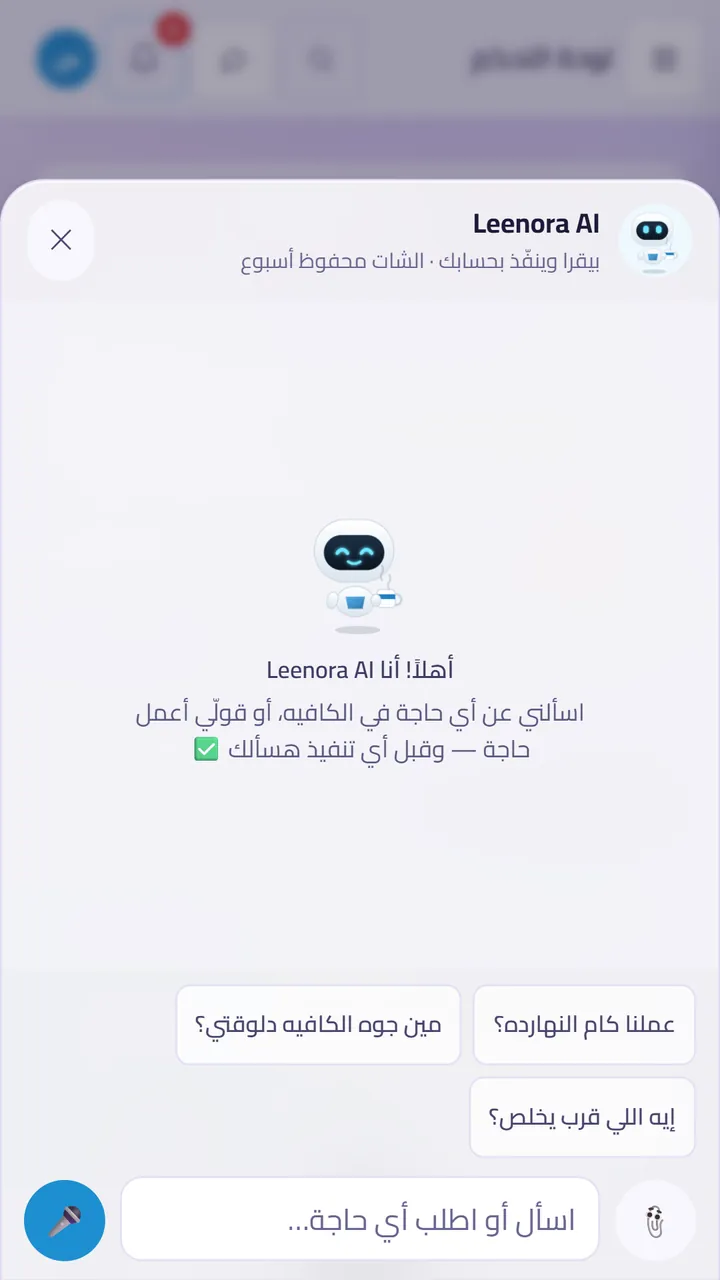
22 / 23Leenora AI on a phone

Me again, this time filling the phone. Three suggested questions wait near the bottom, and the round blue button in the corner is the microphone.
NOVA points at the screen
Leenora AI on a phone
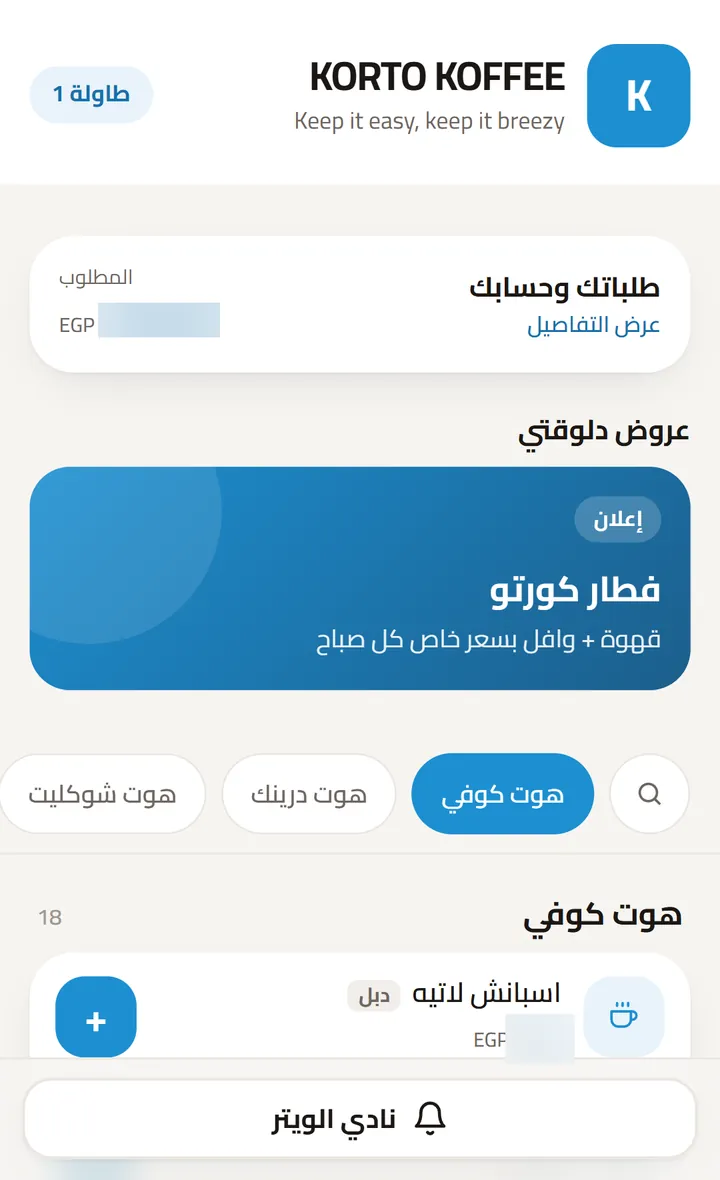
23 / 23Customer QR menu with a demo offer

What a customer sees after scanning the table's QR code. The blue card in the middle is a demo offer, and the button at the bottom calls the waiter.
NOVA points at the screen
Customer QR menu with a demo offer

Who uses it

OwnerPartnerSupervisorCashierWaiterBaristaData entryAccountant

Why it is not off the shelf

What makes it different

01

Built around one café's own day. It started from their paper closing sheets and recipes, and each round of changes came from the owner's requests.

02

Leak control is part of each step: a manager PIN on cancels and discounts, a time lock on back-dated edits, a month close and a full activity log.

03

An AI assistant that knows the café's numbers. It answers in Egyptian Arabic, in the app and on Telegram, and acts only after a confirmation.

Ready for your business

LEENORA Café is a product you can have

Any café or restaurant with tables, a bar or a kitchen can run on the same system, and LEENORA sets it up and customises it for their menu, staff and way of working.

  • We show it to you working
  • We set it up with your data, staff and branches
  • We change screens, reports and roles to fit how you work
  • We train your team and stay for support
NOVA

Want something like this?
Let's talk.

Talk to us on WhatsApp